

If your Skytech Fireplace Remote stops working, you can usually restore the connection yourself in just a minute. Just tap the Learn button on your fireplace receiver box and immediately press the On button on your handheld skytech fireplace remote control to pair them back up. If that does not work, hold the button down for 15 seconds to clear out old memory codes, or check out our premium selection of replacement Fireplace Remotes and genuine Skytech hardware to upgrade your setup.
How to Troubleshoot a Skytech Fireplace Remote Control
Get Your Wireless Hearth Control Working Again in Minutes
If your gas hearth isn't responding to your wireless controller, learning how to clear and re-sync your Skytech fireplace remote control system can save you from a costly service call. Wireless fireplace transmitters rely on simple radio frequency lines that can occasionally drop their connection due to signal interference, weak cell batteries, or a full internal memory bank.
By following a few simple troubleshooting checkpoints such as verifying manual slide overrides, clearing old memory codes, and executing a quick system reset most homeowners can completely restore effortless, on-demand fire control in just a few short minutes.
If your hardware continues to drop its signal or has reached the end of its operational lifespan, you can explore our complete inventory of premium Fireplace Remotes and factory-certified Skytech systems to upgrade your home entertainment hub today. Use our step-by-step diagnostic guide below to locate your receiver box and get your system working seamlessly before the cold weather sets in.
How to Troubleshoot a Skytech Fireplace Remote Control
If you have a standard Skytech fireplace remote control and you can't get it to work with your fireplace, watch our video above or use these simple troubleshooting steps to get it working again.
Step By Step Guide
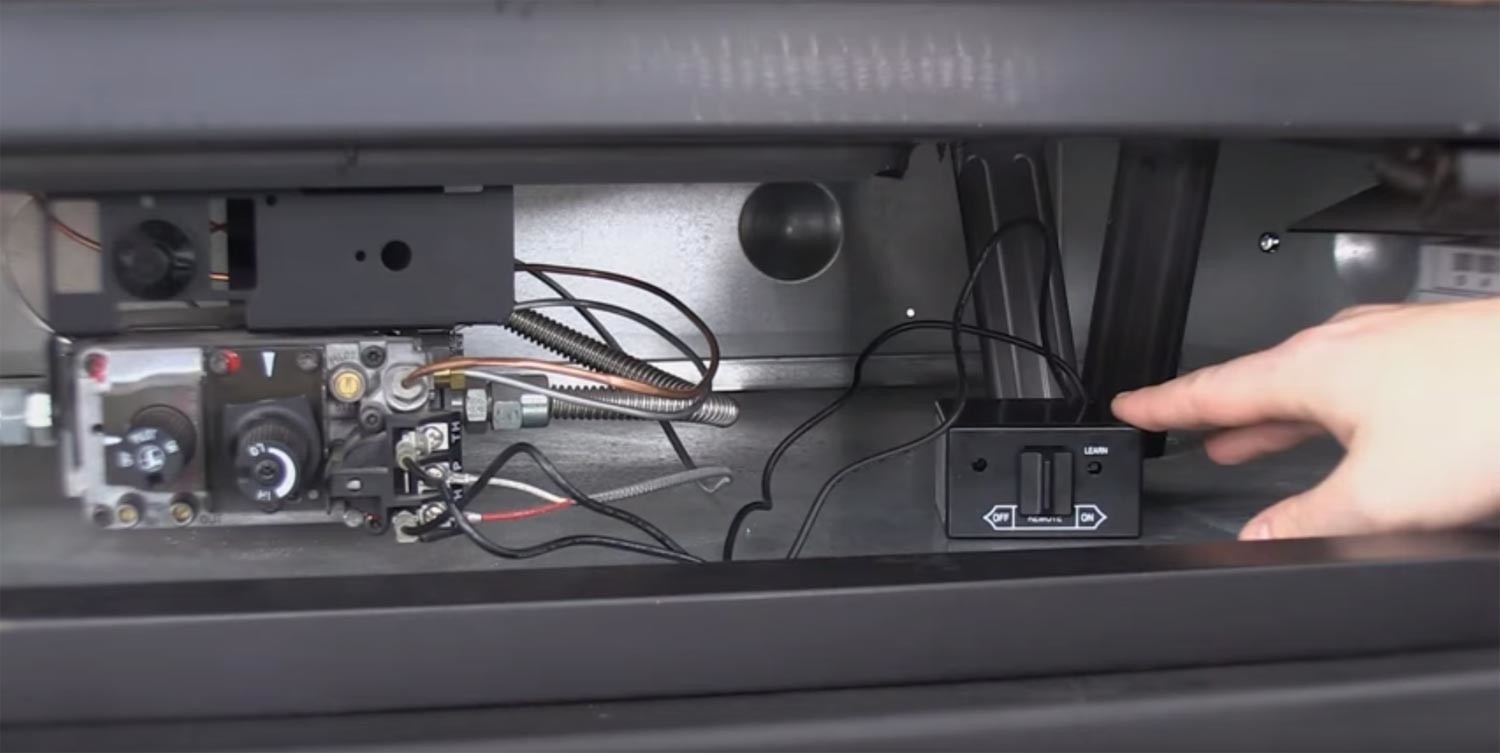
The receiver box will be connected to the fireplace's gas valve.
1. Locate the Receiver Box
Most often your receiver box will be located within the control cavity of your fireplace, like it is here. Check to make sure the wires are secured tightly to the terminals. If your fireplace is working properly and your receiver box is in working condition you should be able to slide the slider switch on the receiver box to the On position, and your fireplace should turn on. If it does not, there are a few quick steps you can take before confirming your receiver box is broken or contacting a gas plumber. First, check if the main gas supply is "ON." Next, see if the pilot is lit. Then, ensure the pilot valve knob is in "ON" position. If the fireplace is still not on, either your receiver box is broken, or more likely you'll need to contact a gas plumber as your fireplace is not in working condition.
2. Check the Batteries
If your receiver box is battery operated, make sure the batteries are new and have a full charge; do so for the remote control too. It's possible that if you haven't replaced the batteries recently, corrosion may have formed. This could prevent the system from operating, and you'll need to replace them.
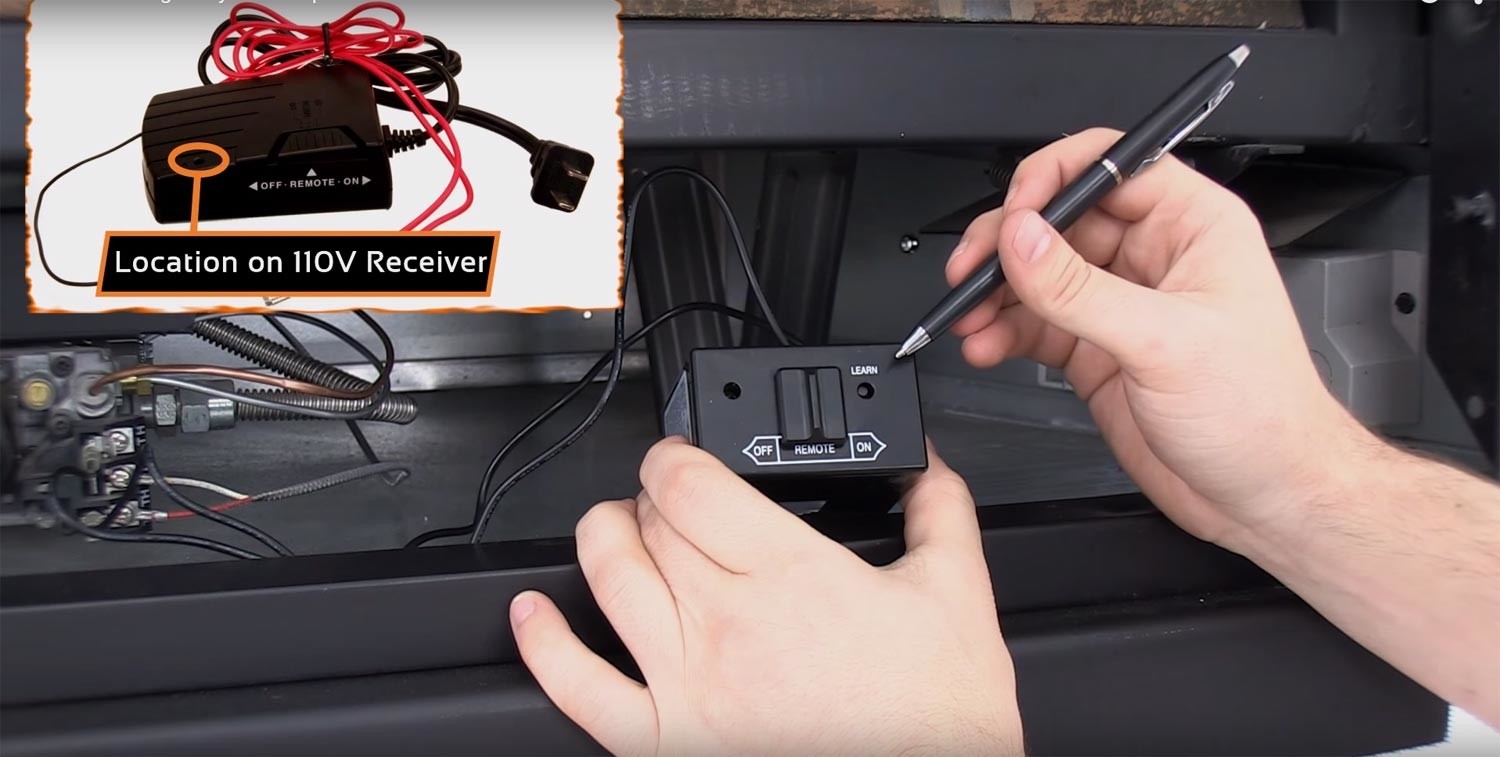
3a. Perform the Learn Function
The remote control communicates to the receiver box via radio frequency signal, so it's common for the signal to be interrupted. Luckily, it's very easy to resync them. Begin by locating the Learn button on the receiver box. Press and release the button quickly; you should hear a beeping noise.
You will need a pen, paperclip, or a similarly sized object to press the reset button.

3b. Continue to Learn Function Process
Immediately after you hear the beeping noise, press the On or Mode button on your remote control. If your remote has both buttons, press the On button. At this point, you should hear a beeping noise again, and your fireplace should immediately turn on, indicating your fireplace remote control has been synced with the receiver box.
Listen for beeps when re-syncing your remote.

4. Reset the Memory
If you perform steps 1-3 and you still can't get your remote to work, you may need to reset the memory. Each receiver box has a small internal memory to store the signals from the remote control, and it's possible for this memory to fill up and not allow the learn function to work. To reset the codes, simply press and hold the same Learn button for a solid 10-15 seconds after which you should hear consecutive beeps indicating the memory has been cleared. Repeat step 3.
Clearing memory offers an additional option for resetting remote codes.
5. Remote Still Not Working?
These troubleshooting steps should solve any issue you're having with a Skytech fireplace remote control. If you're still not able to get your remote to work, feel free to contact us with any further trouble. Additionally, if your remote is under 5 years old, it may still be covered by a warranty. Our product experts are available Monday through Friday 9 a.m. to 5 p.m. Central Time to field your questions.
Fix Your Skytech Fireplace Remote Control with Ease
Troubleshooting an unresponsive Skytech Fireplace Remote is a quick task that can save you a frustrating service call. By checking battery health, testing manual operation modes, and resetting the receiver frequency memory, most homeowners can restore a reliable wireless connection to their skytech fireplace remote control in a few short minutes. If you want to learn more about how these systems function, browse our full collection of Skytech products to keep your fireplace running smoothly all winter long.
Shop Replacement Skytech Fireplace Remote Control Kits
Still cannot get your transmitter and receiver box to talk to each other? Over time, small electronic components simply wear out. Explore our online inventory of genuine Fireplace Remotes to upgrade your hearth layout effortlessly. If you need a hand matching your specific gas valve type to a brand-new skytech fireplace remote control, explore our targeted Skytech collection or contact our team of specialists today!
Frequently Asked Questions
1. Why is my Skytech fireplace remote still not working after replacing the batteries?
If fresh batteries do not fix the issue, the internal memory inside your receiver box might be full. This stops the device from accepting a new signal. Try holding down the Learn button for 15 seconds to clear out old codes, then try the pairing process again.
2. Where is the receiver box located on my gas fireplace?
In most standard setups, the receiver box is located in the bottom control cavity beneath the fireplace hearth. You can usually find it right behind the lower access louver or screen near the main gas valve.
3. What should I do if my receiver box does not beep during the learn function?
If you press the Learn button and do not hear a beep, make sure the receiver's batteries are new and installed facing the right direction. Also, check the wire leads running from the receiver box to the gas valve to ensure they are plugged in tightly.
4. How long does a Skytech fireplace remote system typically last?
With regular seasonal use and proper battery care, a quality Skytech remote system usually lasts between 8 and 10 years. If your remote setup is around this age and keeps dropping its connection, it is likely time to look at replacement Fireplace Remotes to get your system working reliably again.
5. Is there a warranty on my Skytech remote control?
Yes, Skytech remotes come with a factory warranty. If your remote control hardware is under five years old, it may still be covered under their 5-year warranty policy.
6. Can I turn my fireplace on if my remote is completely broken?
Yes, you can still light your fireplace manually. Locate the receiver box under your hearth and slide the main manual slider switch from Remote over to the On position to start the fire without the remote.
Key Takeaways
-
Isolate Your Hardware: Slide the receiver box switch to On. If the fire lights up manually, you know the fireplace works and the issue is just a lost wireless connection.
-
Watch for Corrosion: Check the battery terminals in both the remote and receiver. Old batteries can leak and cause corrosion that stops power from flowing.
-
The Quick Tap Rule: When pairing the units, tap and release the Learn button quickly. Do not hold it down unless you are trying to wipe the system memory.
-
Clear the Memory Cache: If the receiver box ignores your remote, hold the Learn button for 15 seconds until you hear consecutive beeps to clear out old saved codes.


